Verify your payout account
Confirming your bank account before your first payout — and why proceeds are held until you do.
Before RaffleLink sends your raffle proceeds, it confirms that the bank account really belongs to your organisation. It's a one-time check per account, and it guards against proceeds being paid to the wrong place. The test is simple: the name on the account must match your organisation (or its registered business name).
You can sell tickets straight away — verification only matters when it's time to be paid out.
How to verify
Under Settings → Bank Account, choose Verify on the account you'll be paid into.
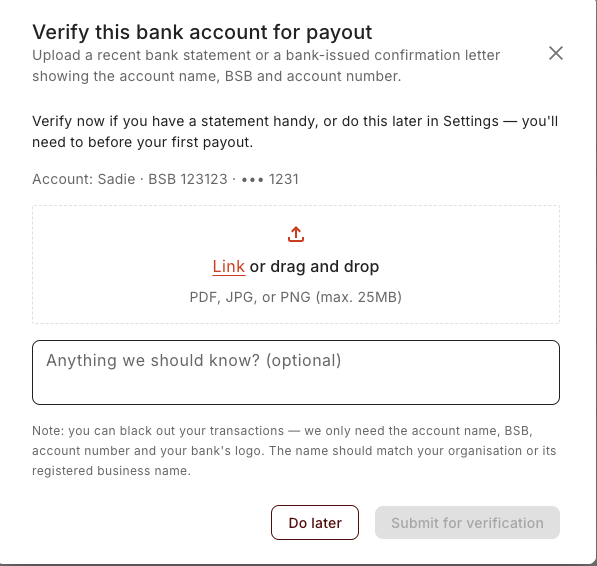
Upload a recent bank statement or a bank-issued confirmation letter showing the account name, BSB, and account number (PDF).
You can black out your transactions — RaffleLink only needs the account name, BSB, account number, and your bank's logo. If the account is held under a different name (an auspicing body, or a trading name), add a quick note in "Anything we should know?" so the reviewer has the context.
Choose Submit for verification.
What happens next
RaffleLink checks your statement against your organisation's details — this takes a few seconds. From there:
- If the name matches cleanly, you're verified on the spot — the account shows Verified.
- Otherwise it goes to In review, and a RaffleLink team member checks it by hand. The account shows In review until they're done. If it can't be verified, you'll see Couldn't verify with the reason, and you can fix the issue and Re-verify.
A genuine account held under a slightly different name is exactly what the notes field and the manual review are for — a mismatch isn't a rejection, just a prompt for a human to take a look.
Personal accounts don't need a statement at all
If your payout account is a personal account — an individual fundraising on the organisation's behalf — there's nothing to verify. You won't see a Verify button on it; the account shows an Attested chip instead, and the tooltip explains why: "Personal payout accounts are covered by the responsibility statement the organiser accepted when the account was added, so no bank statement is needed. Payouts aren't held."
The acknowledgement ticked when the account was set up is what stands behind it, so payouts to a personal account are never held for verification. See Special payout situations for when a personal account applies.
Until it's verified, payouts are held
This is the part to plan around: while an organisation-owned payout account is unverified, it shows Unverified — payouts held, and any payout to it waits. Your raffle still sells normally — it's only the payout that's held, and only until you verify. (Personal accounts and the manual lanes — Invoice us, International — are exempt, as above.)
So verify before your first payout. RaffleLink helps you remember:
- Right after you add a bank account, it offers to verify there and then — "Verify now if you have a statement handy, or do this later in Settings — you'll need to before your first payout." (You can choose Do later.)
- When your raffle goes live, it emails you a Verify your payout account reminder.
- Right after you publish a raffle, the success window points it out too: "Your payout account [ending 1234] isn't verified yet. Verify it now (a bank statement showing the account name) so your payout isn't held when the raffle closes." — with a Verify payout account button so you can do it on the spot. Once you've submitted, it changes to "Thanks. We'll check the statement and email you once the account is verified."
- If proceeds are actually sitting held, RaffleLink emails you a reminder every few days until the account is verified — with the amount that's waiting ("[amount] in raffle proceeds is waiting for you"). Real money is on hold, so these keep coming until you act.
You don't have to chase a held payout down yourself. As soon as the account verifies, any payouts that were held are released automatically into the next payment run — there's nothing to re-request. You'll also get an email confirming the account is verified. If it can't be verified, you'll get one explaining why, with the reviewer's note and a link to resubmit.
Already had an account set up?
Accounts that existed before this check came in are already verified — you don't need to do anything. Verification only applies to new or changed payout accounts.
Once verified, any held payouts are released into the next run and everything flows as normal — see How payouts work and Track your payouts.