Run a raffle for another organisation
Fundraise on behalf of a charity that isn't on RaffleLink yet — request their authorisation (a signed Letter of Authority) and run a one-off raffle.
Want to run a one-off raffle to raise money for a charity — but the charity isn't on RaffleLink? You can, as long as they authorise it with a signed Letter of Authority. You have two ways to get that authority: have RaffleLink email the organisation a link to sign online, or upload a letter they've already signed. Either way, once the authority is in place you're cleared to go live.
You might think of this as running a raffle on behalf of a charity, a third-party fundraiser, or getting a charity to authorise your raffle — it's all this flow.
This is different from being an affiliate: an affiliate runs raffles for an organisation that's already on RaffleLink and has invited them in. This path is for a one-off raffle benefiting an organisation that may not be on RaffleLink at all.
Start the request
When you sign up to RaffleLink, you'll be shown three options for how you want to use it. The one you want here is I want to run a raffle to benefit an organisation, with the subtitle "For individuals or groups fundraising for another cause". Already have an organisation of your own? You can also start this from the organisation switcher at the top of the dashboard — choose Fundraise for an organisation.
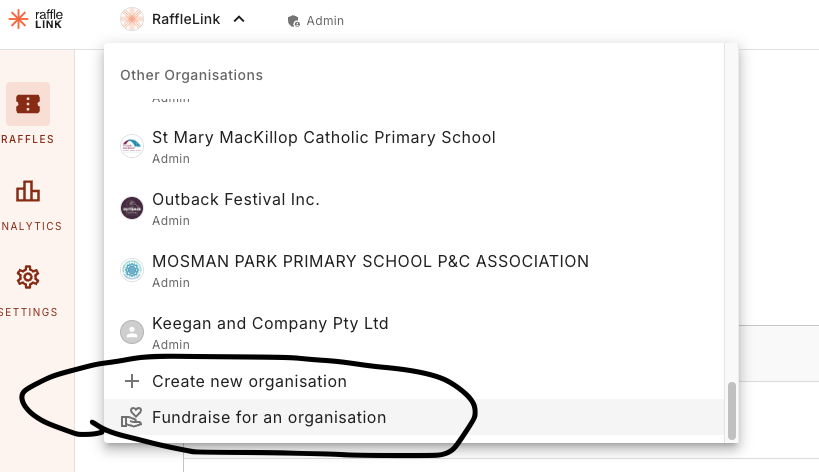
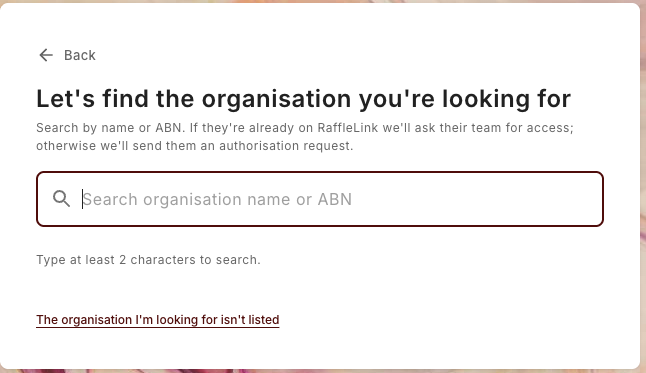
Find the organisation. Search the directory by name or ABN. If they're already on RaffleLink, RaffleLink asks their team for access; if they're not listed, choose The organisation I'm looking for isn't listed to send them an authorisation request.
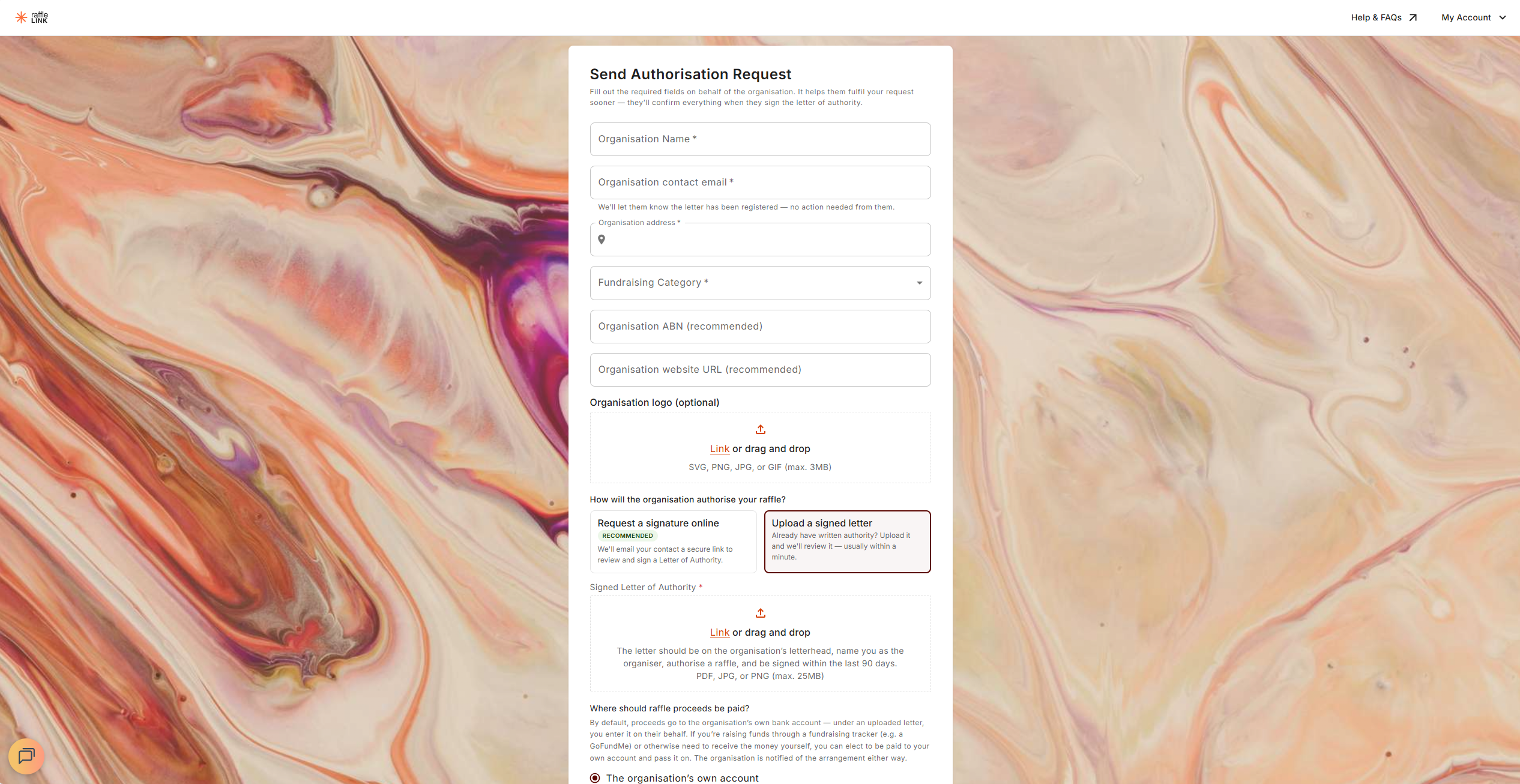
Fill in what you know on their behalf — Organisation Name, Organisation contact email, Organisation address, and Fundraising Category (required), plus ABN and website (recommended) and a logo (optional). It all helps confirm the authority faster.
Choose how the authority is provided — two options:
- Request a signature online (recommended) — "We'll email your contact a secure link to review and sign a Letter of Authority." You'll land on a confirmation, "Authorisation request sent," and the link is valid for 90 days.
- Upload a signed letter — "Already have written authority? Upload it and we'll review it — usually within a minute." We check the letter automatically: a clean one is approved on the spot ("You're authorised!"), and anything that needs a closer look lands as "Letter of authority submitted" while we review it. You can start building either way.
Uploading a letter
Accepted files are PDF, JPG, or PNG, up to 25 MB. The letter should be on the organisation's letterhead, name you as the organiser, authorise a raffle, and be signed within the last 90 days. Because the organisation isn't signing inside the app on this path, you'll also enter their bank account details as part of the request.
Build while you wait
You don't have to sit idle. From the confirmation screen, choose Create your raffle and start building straight away — "Start building now — you can activate it once the authorisation is approved."
What your contact will be asked to do
This applies when you request a signature online. (If you uploaded a signed letter instead, your contact doesn't need to do anything — RaffleLink just lets them know the letter has been registered.)
It's worth knowing what your contact receives, so you can give them a heads-up. The email link opens a short wizard — no login needed — where they:
- Certify they're authorised to represent the organisation.
- Confirm the organisation's details (and fix anything you got slightly wrong).
- Add the bank account the proceeds will be paid into — "Raffle proceeds are paid into this account after the raffle ends."
- Sign the Letter of Authority electronically (typed or drawn). They can preview the document before finishing.
That's it — the authority covers one raffle, run by you, with all proceeds going to the organisation. On the final Signature step they're also offered "Want to save your details for next time?" with a Yes, create my account option, so signing the letter and claiming the organisation's page happen in the same flow.
Victorian organisations
If the organisation is based in Victoria and isn't already VGCCC-declared, the confirm-details step also offers an optional VGCCC declaration number field. Adding it lets raffles benefiting the organisation sell tickets in Victoria — RaffleLink checks it against the VGCCC register and confirms it on the final screen. It's optional and never holds up the authorisation. See VGCCC declaration.
Where the proceeds go
By default, everything you raise is paid straight to the organisation's own account — that's the norm, and the simplest.
Sometimes, though, the money needs to come to you first — say you're running a fundraising tracker (like a GoFundMe) alongside it, or you need to buy and hand over the prize yourself. In that case you can propose being paid into your own account and passing it on. When you ask to fundraise, you'll see "Where should raffle proceeds be paid?" with two choices:
- [the organisation]'s own account (the default), or
- My own account — I'll pass the funds on.
If you choose your own account, you enter your bank details and tick an acknowledgement — "I understand raffle proceeds will be paid to my personal account, and I am responsible for distributing the funds... to the benefiting organisation." The organisation sees it clearly marked as a personal account and has to consent when they approve you; it's recorded on the Letter of Authority and disclosed on the tax invoice, so it's all above board. (More on personal-account payouts in Special payout situations.)
Going live once they've signed
Until they authorise, your Activate button stays disabled, and you'll see a banner: "Organisation pending authorisation — [organisation] must authorise your raffle before it can go live. We've emailed them a request; you can keep editing in the meantime." If they're taking a while and the request is still pending (or has expired without being actioned), there's a Resend email button; resending an expired request sends the organisation a fresh link. When a letter is under review, was declined, or the authorisation has lapsed, the banner says so instead and there's nothing to resend.
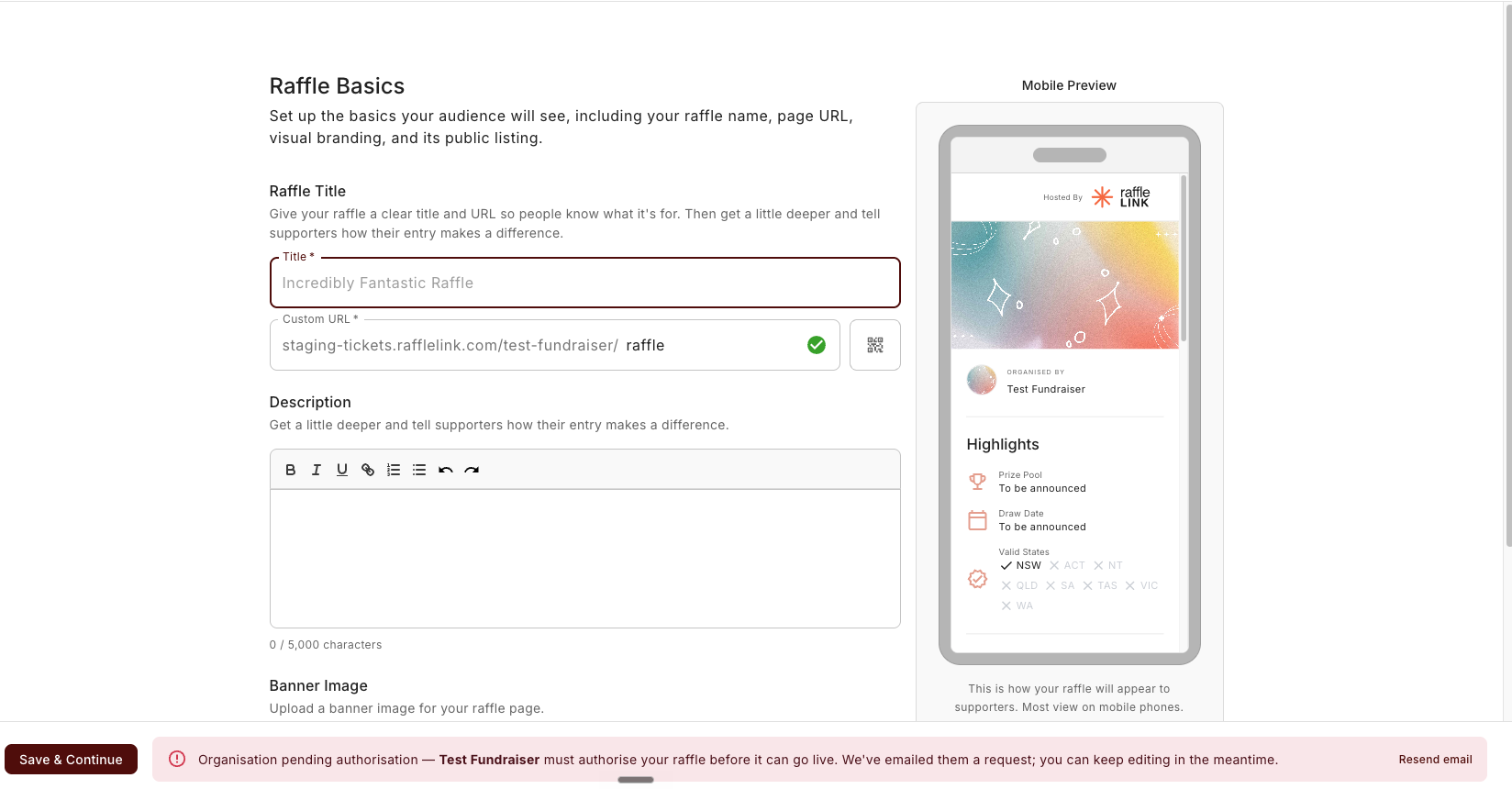
Once they sign, that flips to green: "[organisation] has authorised your raffle — you can take it live when you're ready." You're then free to activate as normal. If you uploaded a signed letter and it passed review, there's nothing to wait for — you're authorised straight away.
If the organisation is on RaffleLink too
If the benefiting organisation is (or becomes) a RaffleLink user while an authorisation is still pending, their admins see a Review & sign prompt on their own dashboard — so they can complete it from inside the app rather than digging out the original email. If the request has expired, though, the Review & sign button is withheld and their admins are told to ask you to resend it first.
How your raffle is credited
On the public raffle page, the organisation is shown front and centre — In support of [organisation] — with a line underneath: Run & promoted by [you] · authorised fundraiser. The cause stays the headline; you're credited as the fundraiser running it. The name shown is your account name, or a business / trading name if you've set one in My Account.
Why your dashboard sits under someone else's name
The first thing that surprises most Independent Organisers is opening their raffles and seeing the organisation's name at the top, not their own. That's expected, and there's a banner on your raffles page explaining it:
"You're fundraising for [organisation] as [your name]. [Organisation] is the organisation the raffle is run under, so your dashboard sits under its name. Ticket buyers see "In support of [organisation]" on the raffle page, with "Run & promoted by [your name] · authorised fundraiser" shown beneath it."
The raffle is legally run under the organisation, which is why its name frames everything — but your credit as the fundraiser is there on the public page where buyers actually see it.