Add a Ticket Seller to your team
Inviting someone whose only job is running the booth.
The Ticket Seller role is for people who'll run the booth at an event but shouldn't have access to anything else: raffle settings, payouts, reports, the rest of the organisation. A volunteer at a one-off event, a casual staffer, a teammate you trust at the door.
There are two places sellers come on board, depending on who's bringing them in:
- Org admins invite sellers from Settings → Team Members, for the whole organisation or a chosen list of raffles.
- Affiliates and Independent Organisers invite their own sellers from the SELLERS page in their dashboard menu. Those sellers can only ever sell on that organiser's raffles.
Admins: invite from Settings
Email is simplest for one or two people:
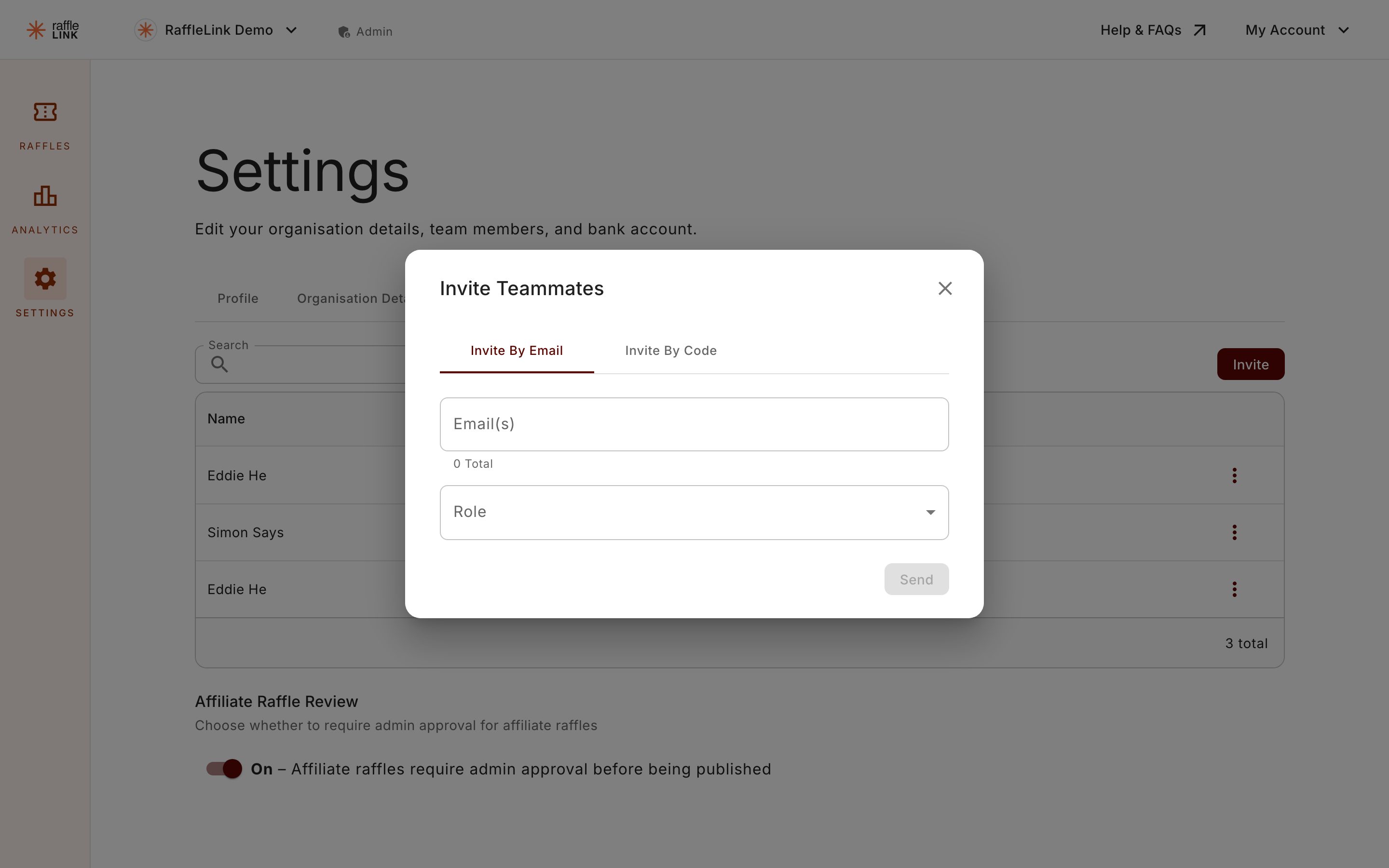
From your organisation's Settings → Team Members, open Invite teammates.
On the Invite By Email tab, add the seller's email.
Choose Ticket Seller from the role dropdown.
Optionally, narrow where they can sell. When the role is Ticket Seller, a Limit to raffles (optional) field appears: "Leave empty to let them sell for every raffle".
Send the invite.
When they accept, they're added to your organisation as a Ticket Seller. See Invite teammates for the rest of the invite flow.
Change a seller's raffle access later
You can adjust a seller's raffle list any time. Open the ⋯ menu on their row in the team list and choose Edit Raffle Access. The dialog ("Raffle access — " followed by their name) asks you to "Tick the raffles this seller can sell at the Ticket Booth. Leave all unticked to let them sell for every raffle."
The team list shows each seller's situation at a glance: a raffle-limited seller's row lists their raffles ("Sells: …"), and a seller invited by an organiser shows who they sell for ("Sells for …").
Or share the organisation's seller access code
Bringing on several sellers at once, like a team of volunteers for a big event? You don't have to email each one. On the Invite By Code tab of the Invite Teammates dialog there's a Ticket Seller access code, alongside the affiliate one. Share it, and anyone who enters it joins your organisation straight away as a Ticket Seller.
Copy the code to hand it out, or Reset it any time to stop the old one working. See Invite teammates for how the code tab works.
Affiliates and Independent Organisers: the SELLERS page
If you fundraise as an affiliate, or run an authorised raffle as an independent organiser, you can bring on your own helpers without asking an admin. Open SELLERS in your dashboard menu to reach the Ticket Sellers page: "Invite helpers to sell tickets for your raffles in person. Sellers you invite only see the Ticket Booth for raffles you run — never the rest of the organisation."
The page gives you two ways to bring sellers in:
- Share your seller access code — a 6-character code that's personal to you. Helpers sign in at /organization/join and enter it; the join screen tells them they're joining "as a Ticket Seller, selling for" you, with your name shown. A Reset link swaps in a fresh code. Resetting stops anyone new joining with the old one, but doesn't remove sellers who've already joined.
- Invite by email — add their addresses and choose Send invites.
Below the cards, a Your sellers table lists everyone you've brought in, with a Status chip of Active or Invited. Each row's ⋯ menu offers Remove for an active seller, or Cancel invite for a pending one.
Where a seller can sell
The scope depends on who invited them:
- A seller invited by an org admin can sell on every raffle in the organisation. If the admin limited them to a raffle list, they sell on just that list.
- A seller invited by an affiliate or independent organiser can sell only on raffles that organiser runs. That's automatic, and it covers raffles the organiser creates later too. There's nothing to update.
If the sponsoring organiser leaves the organisation, changes role, or deletes their account, their sellers are removed and their pending invites cancelled. Those sellers exist to help that organiser, so their access ends with them.
The invitation email
Whichever way the invite goes out, the seller receives the standard team invitation email, and it expires after 7 days. The email doesn't name the organiser who invited them, so if you're an affiliate inviting helpers, it's worth giving them a heads-up that a RaffleLink invitation is on its way.
What a Ticket Seller can and can't do
They can:
- Sign in and use the booth on any raffle in their scope.
- See and manage the orders they've personally placed.
They can't:
- Edit raffles, settings, prizes, or any other part of your organisation.
- See orders other sellers have placed (admins can — see Manage booth orders).
When they sign in
Because their entire job is the booth, a Ticket Seller is taken straight to the booth when they sign in. They don't have to find it. See The seller experience for what their day looks like.