Cancel a raffle
Calling off a live raffle that can't go ahead — and how buyers get refunded.
Sometimes a live raffle just can't go ahead — sales fell well short, a major prize fell through, or the event behind it was called off. If that happens, you can cancel the raffle yourself, and RaffleLink refunds your online buyers automatically.
Cancelling is deliberately a bit of a process, because real money has changed hands. It's not the same as reverting to draft (which is only possible before any sales).
Who can cancel, and when
Cancelling is an admin action. You'll find Cancel raffle in the raffle's More (⋯) menu on its management page — it's a deliberately tucked-away, red action, since it's rare and irreversible.
No sales yet? You won't see Cancel at all
If nothing has sold, Cancel raffle is hidden and Revert to draft takes its place — reverting takes the raffle offline instantly, keeps everything editable, and costs nothing, so there's no reason to cancel. Cancel reappears the moment a ticket sells.
Self-serve cancellation is available when both of these are true:
- Your raffle has no permit in any state, and
- No payout has been sent yet.
If either isn't the case, you'll see: "This raffle can't be cancelled here. Please contact RaffleLink support and we'll help you cancel it." Permitted raffles and ones that have already paid out need a hand from our team — email support@rafflelink.com.
What happens to buyers' money
This is the part to understand before you start:
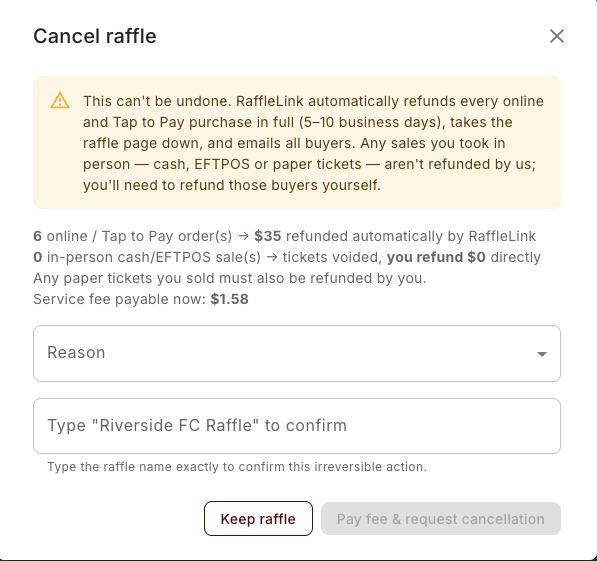
- Online and Tap to Pay purchases are refunded 100% automatically (the ticket price and any fee assistance), back to the original payment method — typically within 5–10 business days. RaffleLink handles these; you don't lift a finger.
- In-person cash, EFTPOS, and paper sales aren't refunded by us. Those tickets are voided, but you refund those buyers yourself — RaffleLink never touched that money.
The cancellation window shows you the exact counts and amounts for your raffle before you commit, so there are no surprises.
You pay the service fee
When you cancel, you pay RaffleLink's service fee on the gross that was collected. Here's the why: once every online buyer is refunded in full, there's no money left for RaffleLink to take its fee from at payout time — so it's billed to you instead. You pay it up front through a secure Stripe Checkout page (the button reads Pay fee & request cancellation), and it's refunded if our team declines the cancellation. If your raffle had no sales, there's no fee and no checkout — it goes straight through.
How to cancel
Open the raffle's More (⋯) menu and choose Cancel raffle.
Pick a Reason (Insufficient ticket sales, Prize no longer available, Event / draw cancelled, Created in error, or Other), review the refund summary, then type the raffle name to confirm — a guard against accidental cancellation.
Choose Pay fee & request cancellation. You'll be taken to Stripe to pay the service fee, then back to your raffle.
After you request it
A cancellation isn't instant — RaffleLink reviews it first. As soon as you submit:
- Sales pause immediately. Your raffle stays up but stops selling, and your overview shows: "Cancellation requested — pending RaffleLink review. Ticket sales are paused until it's approved or declined."
- Buyers see a neutral notice — "Ticket sales are temporarily paused. Please check back soon." — not a cancellation, since we might decline it.
- Once approved, the raffle is cancelled, the automatic refunds go out, and your page shows it was cancelled. Buyers get a confirmation email (see, from their side, If a raffle is cancelled).
If anything about your situation is unusual — a permit, a payout already out the door, an installment raffle — don't force it; contact support@rafflelink.com and we'll sort out the right path.