Community Board
A public message board on your raffle page — your announcements, plus words of support from your ticket buyers.
The Community Board is a public message board on your raffle page. You post announcements; the people who buy tickets leave short messages of support. A busy board does a lot of quiet work for you — it shows new visitors that real people are behind this raffle, and behind them, a real community.
The board is optional and off by default. Turn it on whenever it fits your raffle.
Turn the board on
- Open your raffle for editing and go to the Optional step.
- In Other Raffle Settings, switch on Enable Community Board.
That's it. The board section appears on your raffle page once there's at least one post — until then, buyers see nothing extra, so switching it on early costs you nothing.
Anyone who can edit the raffle can turn the board on: org admins on any raffle, and affiliates or independent organisers on raffles they created.
Post your own announcements
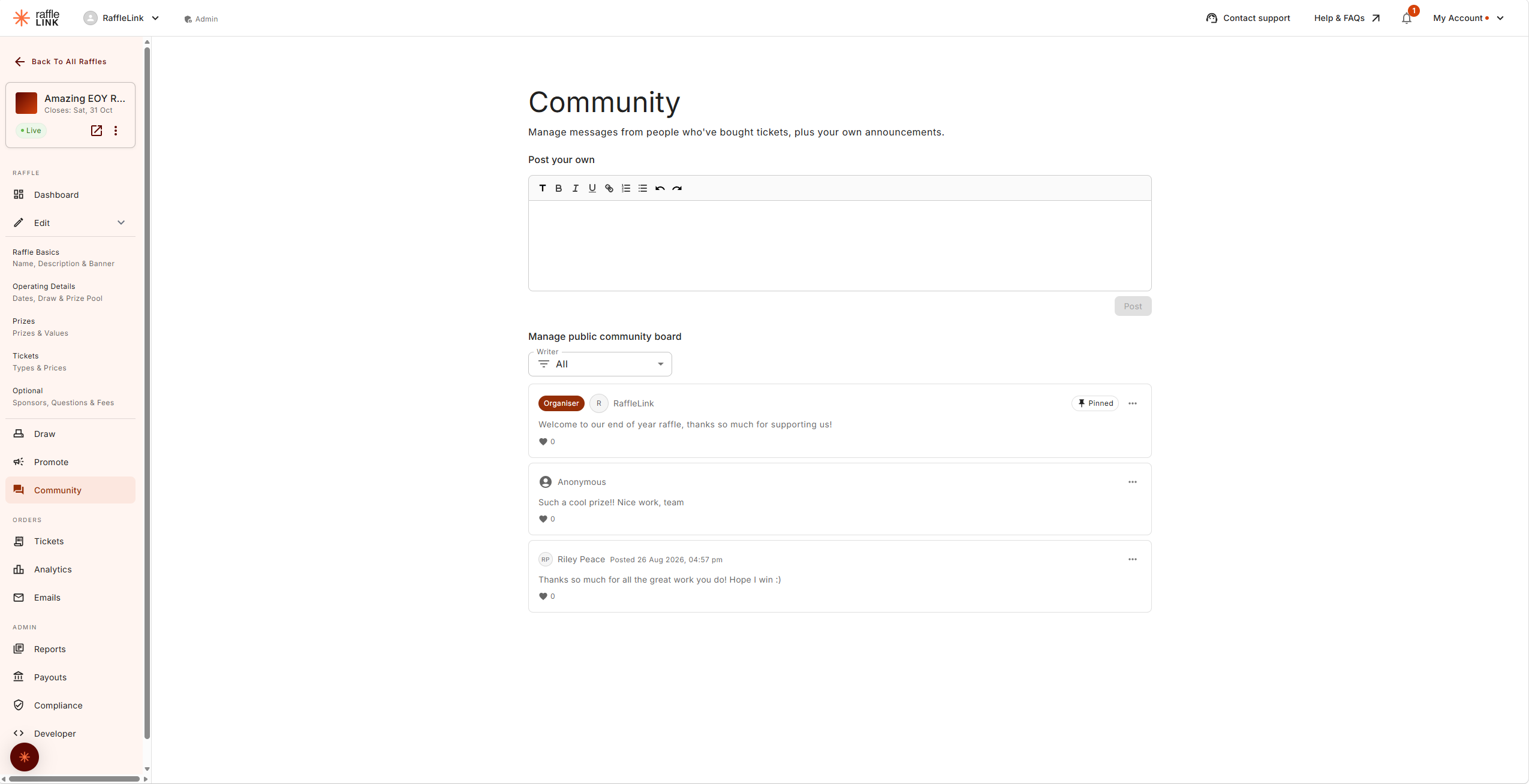
Once your raffle is live with the board enabled, a Community page appears in your raffle's menu (next to Promote).
Under Post your own, write your update in the composer — the first line becomes the announcement's title. Choose Post and it's on your raffle page straight away. Announcements show your organisation's name with an Organiser badge, so they stand apart from supporter messages.
Use it the way you'd use a social post: milestones ("Halfway to our goal!"), prize spotlights, a thank-you before the draw. Each announcement's ⋯ menu lets you Edit, Pin, or Delete it later.
What your supporters can post
Right after buying tickets, buyers see a Share some words of support card on their confirmation page. They can write up to 500 characters, and can choose Leave comment anonymously if they'd rather not show their name.
A few guardrails are built in:
- Only completed purchases can post — one message per purchase.
- Messages show the buyer's name (or Anonymous) and nothing else. No email, no suburb, no spend.
- Buyers can't post from the raffle page itself — the only way in is buying a ticket. That's what keeps the board a genuine record of support.
Manage the board
The Manage public community board section of your Community page shows everything in one feed — your announcements and supporter messages together, pinned posts first. The Writer filter narrows it to Organiser or Supporters.
Messages appear on your public page as soon as they're posted, so it's worth checking in every now and then. From each post's ⋯ menu you can:
- Pin / Unpin — keep one announcement and one supporter message at the top of the board. Pinning a second one simply replaces the first.
- Hide / Unhide — take a supporter message off the public page. It's hidden, not deleted, so you can restore it any time.
- Edit / Delete — your own announcements only. Supporter messages can't be edited by anyone, including you — that's deliberate, so the board stays an honest record.
You can also pin and hide directly from your raffle page while viewing it — the same ⋯ menu appears on each card when you're signed in as the organiser.
Likes
Anyone with a buyer account can like posts on the board. Visitors without one are invited to sign in first.
Turning it off mid-raffle
You can switch the board off at any time, even while the raffle is live — you'll be asked to confirm, since it takes the board off a page supporters are already using. Nothing is lost: turn it back on and every message reappears.