Run a raffle benefitting another organisation
Keep your own branding and workspace while raising funds for a different organisation — shown as "Benefitting [their name]" once they approve.
Sometimes your organisation runs the raffle, but the money is raised for a different organisation. RaffleLink shows this as a Benefitting line on your raffle page: your organisation stays the organiser, and theirs is credited as the one benefitting.
How this differs from the other two paths
- Affiliate — they own the raffle; you're invited into their organisation to run it for them.
- Run a raffle for another organisation — the charity isn't on RaffleLink; they authorise a one-off raffle by signing a Letter of Authority.
- Benefitting (this page) — the raffle stays yours, in your workspace and under your branding, and simply credits another organisation as the beneficiary.
Adding a benefitting organisation
You'll find Benefitting organisation on the raffle builder's Customise step. It's an Admin action — affiliates run raffles for an organisation, so only your organisation's own admins can commit a raffle to benefitting someone else.
There are two ways to link one:
- An organisation you administer. If you're an admin of both, pick it straight from the list — your admin seat is the consent, so it's linked immediately.
- Any other organisation. Choose Another organisation… and search. Their admin approves the request before anything appears.
Not on RaffleLink yet? You can add them by name and contact email — RaffleLink creates their page and emails their contact a link to claim it, then they approve the request from their own dashboard.
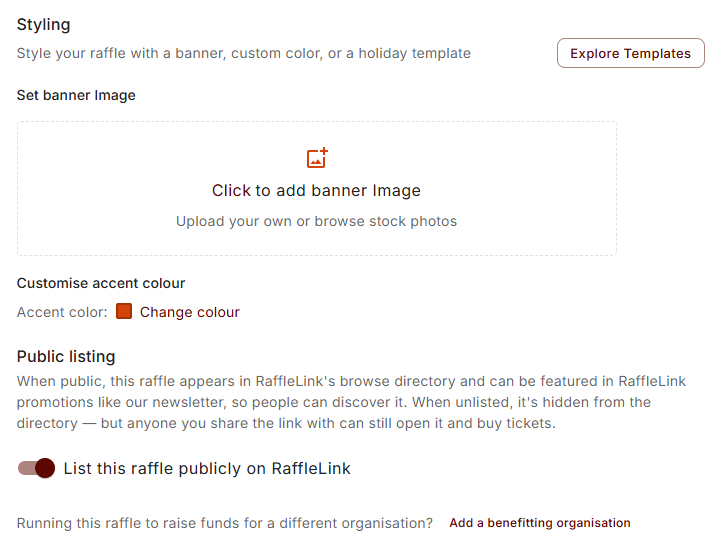
Your raffle isn't held up
A pending request doesn't block anything — your raffle can go live in the meantime. The Benefitting line simply doesn't appear until their admin approves. (The one exception is a Victorian raffle relying on their declaration — see below.)
Only one request per raffle can be pending at a time, and you can withdraw it — they'll get a courtesy note that no action is needed.
Approving a request (the benefitting organisation's side)
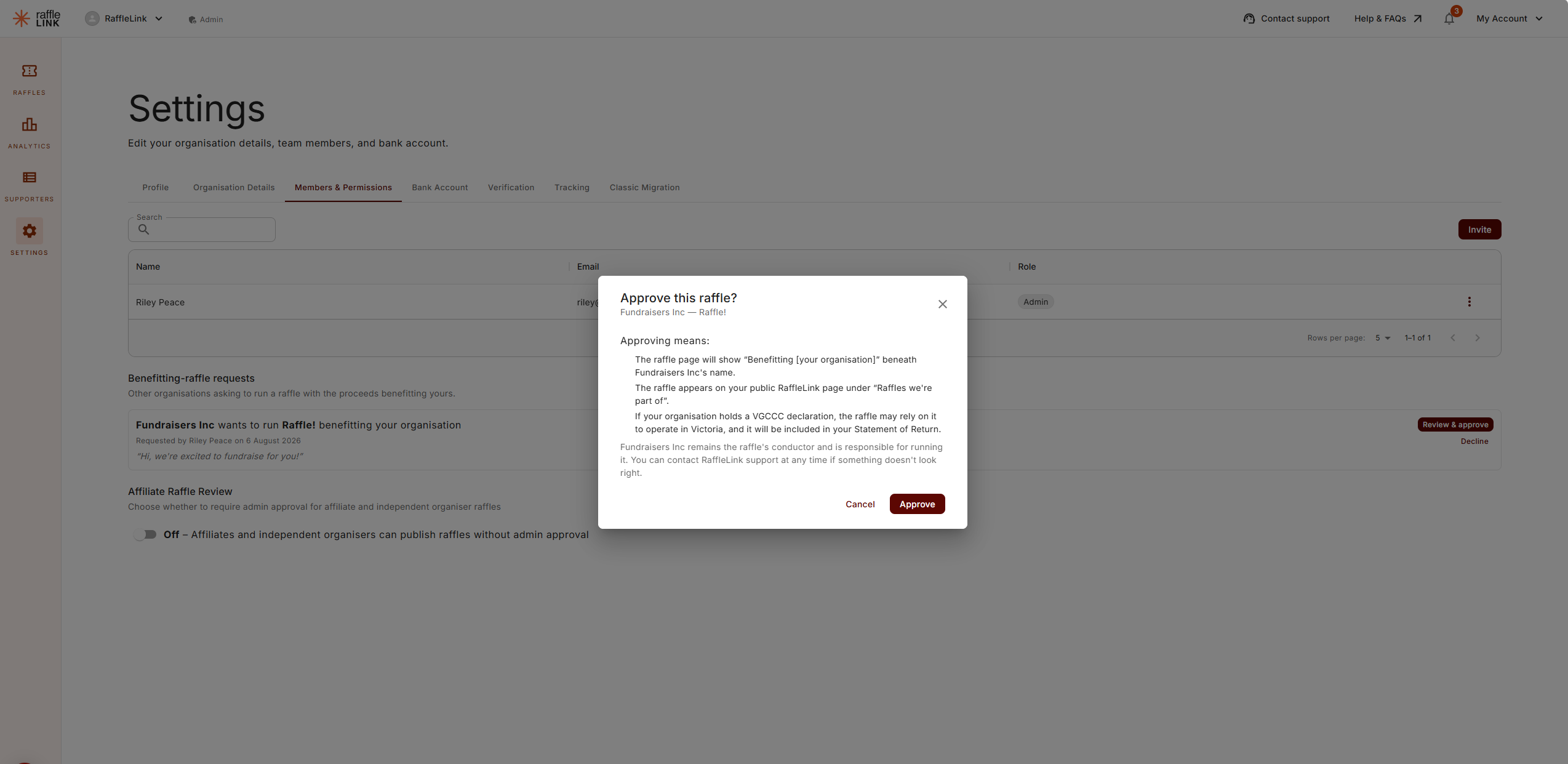
If another organisation asks to run a raffle benefitting yours, you'll get an email, and a banner appears on your Raffles page — "[n] request needs your approval… Nothing happens on their side until you respond." The requests themselves live in Settings → Members & Permissions.
Approving is a considered decision, so the dialog spells out exactly what you're agreeing to:
- The raffle page will show Benefitting [your organisation] beneath the organiser's name.
- The raffle appears on your public RaffleLink page under Raffles we're part of.
- If your organisation holds a VGCCC declaration, the raffle may rely on it to operate in Victoria — and it will be included in your Statement of Return.
The organiser remains the raffle's conductor and is responsible for running it. Approving grants no role in their organisation and no access to their account.
What supporters see
On the public raffle page, the benefitting organisation appears beneath the organiser as Benefitting [name], with their logo, linking to their RaffleLink page. Nothing else changes — the organiser is still shown as the organiser.
Victoria: borrowing a declaration
This is the part with real compliance weight. Normally, selling tickets in Victoria requires your organisation to hold a current VGCCC declaration. If your raffle has an admin-approved benefitting organisation and they are declared, your raffle can operate in Victoria on the strength of their declaration.
Two things follow from that:
- The Statement of Return is attributed to them, not to you — they're the declared organisation for that raffle.
- Once the raffle has sold into Victoria on their declaration, you can't change or remove the benefitting organisation. You'll see: "This raffle operates in Victoria under [their] VGCCC declaration, so the benefitting organisation can no longer be changed. Contact RaffleLink support if this needs correcting."
Only an approved request carries the declaration
Linking an organisation you administer yourself is enough for the display, but the Victorian declaration passthrough needs the benefitting organisation's admin approval on record. If you clear or re-point the benefitting organisation, that consent is retired — you can't approve, clear, and quietly re-borrow it.
Good to know
- Everything else stays with you. Permits, payouts, reports, and the draw all belong to your organisation as the conductor — the only exception is the Victorian declaration above.
- It's always a registered organisation. You can't name an individual or type in free text as the beneficiary. If you're raising money for a person in need, Queensland has a separate path — see Fundraise for an individual.
- Where the money goes doesn't change automatically. Proceeds still settle to your organisation's payout account. If they should reach the benefitting organisation instead, set that up deliberately — see Multiple bank accounts and Special payout situations.