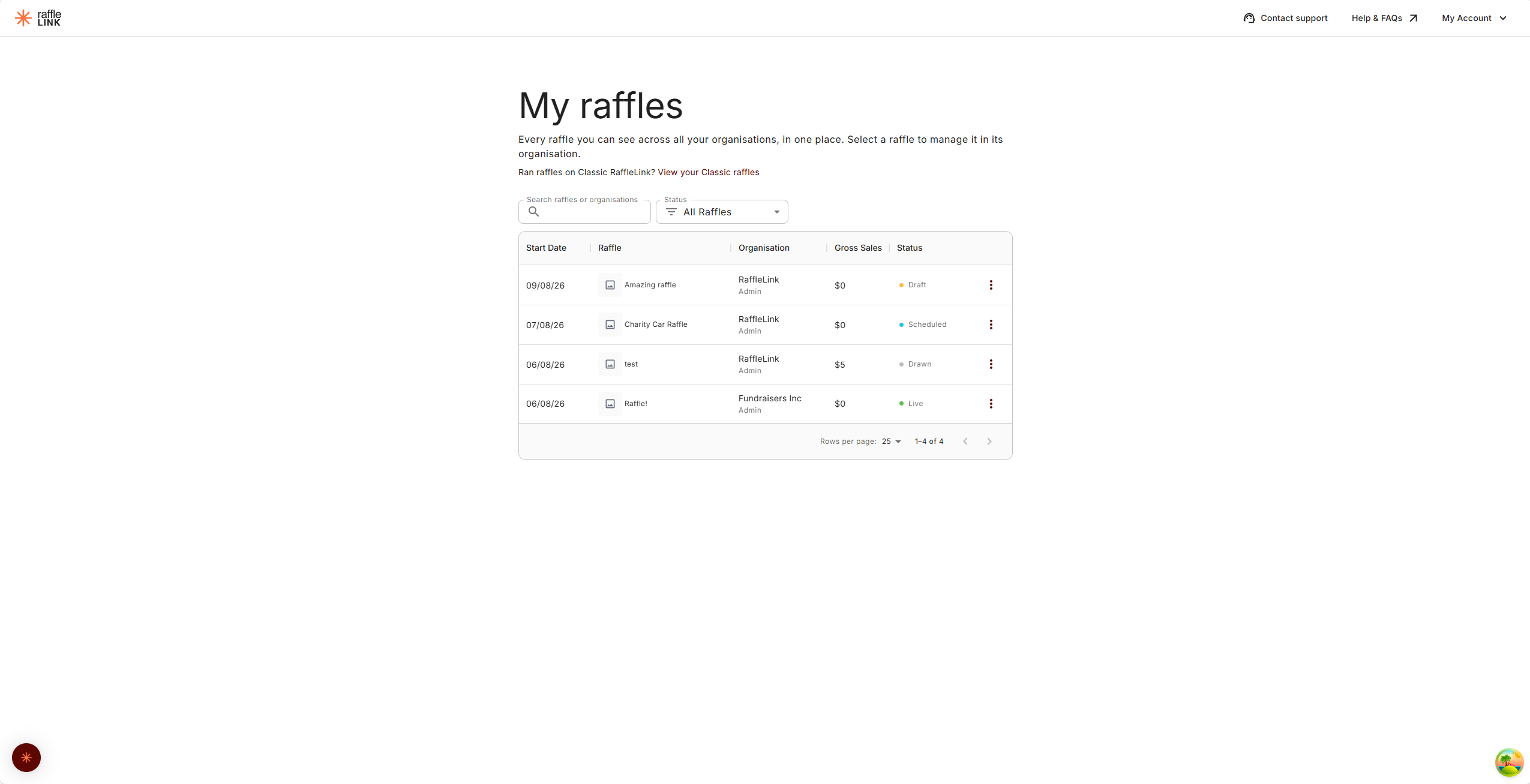
My raffles — everything in one place
See every raffle you can access across all your organisations, and duplicate a raffle from one organisation into another.
If you belong to more than one organisation, My raffles saves you switching between them to find something. It's one list of every raffle you can see, across all of them.
Open it from My raffles in your account menu (it's also in the organisation switcher).
What you'll see
The same raffle list you're used to, plus an Organisation column showing which organisation each raffle belongs to and what your role is there. Search matches the raffle name or the organisation name.
You only ever see what you'd see inside each organisation — the list follows your role in each one. So you'll see everything in an organisation where you're an admin, only your own raffles where you're an affiliate or independent organiser, and no drafts where you're a reader.
Selecting a raffle takes you into that organisation to manage it, exactly as if you'd switched to it first.
Ticket Sellers won't see this list
The Ticket Seller role is booth-only, so it has no raffle list to gather — sellers go straight to the booth as usual.
Duplicating into another organisation
From the list (or from a raffle's own menu) you can choose Duplicate to another organisation… and pick where the copy should land. You can choose any organisation where you're allowed to create raffles.
The copy starts as a draft in that organisation. Names, prizes and pricing carry across — but state permits, payout details, and authority links do not. That's deliberate: those belong to the organisation that earned them, so the new draft needs its own.
If an organisation can't take the copy right now — a hold on raffle creation, say — it appears in the list but greyed out with the reason.
Your Classic raffles
If you ran raffles on RaffleLink Classic, choose View your Classic raffles to see them. This list is matched to your verified email address, not to an organisation — so it finds your history even if it sat under a different group, and you don't need to be an admin anywhere.
You'll be asked to verify your email first if you haven't already.
From any Classic raffle you can choose Replicate to start a fresh draft in any of your organisations. Names, prizes and pricing carry across; buyer details never move.
This is different from importing an organisation's Classic history
Linking a whole organisation's Classic history — so its past raffles, supporters and totals appear in its reports — is a separate, admin-level job done from that organisation's settings. See RaffleLink Classic history. The list here is just your raffles, for copying into a new draft.
If nothing shows up, your Classic history may sit under a different email address — contact support@rafflelink.com and we can help move it across.