Sell paper tickets too
Run a hybrid raffle — sell paper tickets in person alongside your online tickets, in one combined draw.
Plenty of raffles sell tickets both ways — online, and on paper at an event or over the counter — and draw them all together. RaffleLink calls this a hybrid raffle: your online tickets and your paper tickets share one capacity and one fair draw.
You sell paper tickets the way you always have (a printed book, cash in a tin), and in RaffleLink you log how many you've sold as you go. When it's time to draw, both kinds of ticket are in the same barrel.
Paper tickets aren't available on 50/50 raffles: the pot only counts online and Ticket Booth sales.
Two ways to sell in person
There are two different "in person" options, and they're not the same thing:
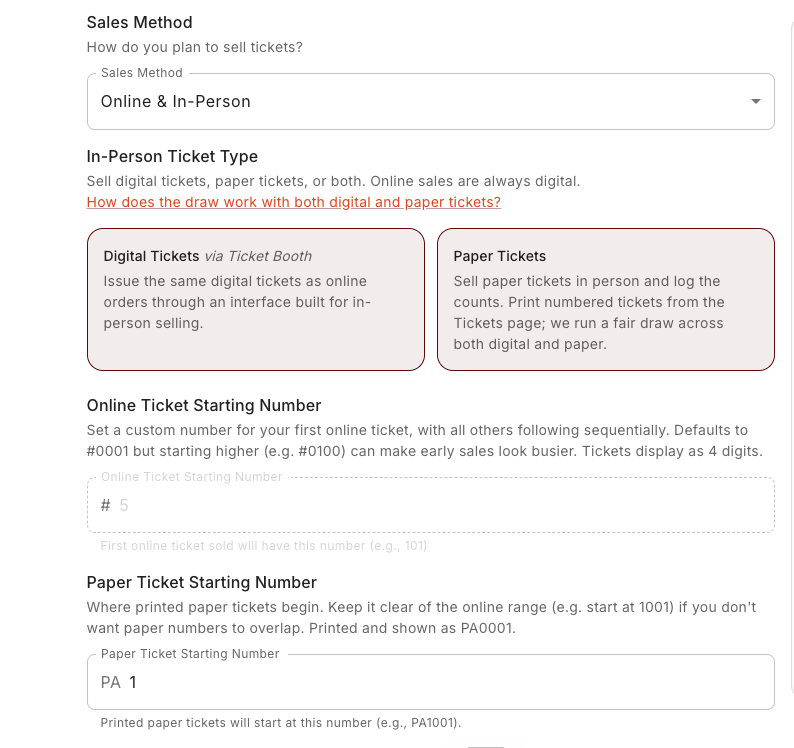
- Digital Tickets via Ticket Booth issues the same digital tickets as an online order, through an interface built for selling face to face. See Ticket Booth.
- Paper Tickets (this page) is for genuine printed tickets you hand over and track by count.
You can use either, both (there's a Digital Tickets & Paper Tickets option for exactly that), or neither.
Turn on paper tickets
On the Tickets step, set Sales Method to Online & In-Person. An In-Person Ticket Type(s) dropdown appears — choose Paper Tickets, or Digital Tickets & Paper Tickets if you want the Ticket Booth as well. The paper option explains the model: "Sell paper tickets manually and keep track of the stubs. We can help with printing or you can use your own tickets, and we'll run a fair draw across both."
There's also a How does the draw work with both digital and paper tickets? link right there if you want the detail before committing.
Choosing paper also sets your Draw Method to a paper-aware one (Hybrid Draw (Manual), Hybrid Draw (Automatic) or Combined Hat Draw) further down the same step — see Tickets and pricing.
Once paper sales exist, you can't turn it back off
The moment you've logged a paper sale, the paper option locks on — you can't switch the raffle back to online-only with paper tickets already in the draw. The dropdown tells you so: "Paper sales already exist, so paper tickets cannot be turned off." Decide before you start selling.
Print your tickets
Print numbered tickets straight from RaffleLink so every stub has a unique number. On the Tickets page's Paper Tickets tab, choose Print Options and stay on the Free Download tab: set Total Tickets for this run (up to 600 per download) and choose Download. Numbering continues automatically from your last run, so there are never any overlaps — download another batch whenever you need more.
Paper tickets carry a PA prefix (for example, PA0001), which keeps them distinct from your online ticket numbers. You set where they begin with the Paper Ticket Starting Number on the Tickets step — keep it clear of your online range (for example, start paper at 1001) so the two never overlap. The stub number is what you'll enter if a paper ticket wins.
When you print, you can choose how many tickets per page (3, 4, or 5 — fewer per page means bigger tickets), and whether to add border cut lines so sheets cut cleanly edge to edge. Want to test your printer first? Tick This is a test. Don't reserve. — those come out watermarked and don't use up any real ticket numbers. There's also a Start from field for when you need to control exactly where a run begins.
Each printed ticket carries your organisation logo and name, the prize pool, the draw details, and a QR code that takes buyers straight to your raffle page for the full prizes and terms. The tear-off stub has the PA number and room for the buyer to write their name, mobile, email, and address — that's the half you keep for the barrel.
Want them printed for you?
You don't have to run a few hundred tickets through your own printer. The Print Options page has a second tab, Professional Printing, where you can order proper perforated booklets and have them delivered. See Order professionally printed tickets.
Log paper sales as you go
The Tickets page has two tabs — Digital Tickets and Paper Tickets. On the Paper Tickets tab, choose Log to record your sales. What you're asked for depends on the draw method you picked:
On Hybrid Draw (Manual) you log a total. Use the Enter Total tab for a straight count, or Enter Ticket Range if you'd rather give the first and last number you sold and let RaffleLink work the total out.
On Hybrid Draw (Automatic) you log the ticket numbers themselves: a starting and ending ticket number, which is what the draw uses to name a winning stub. Leave the ending number blank to log a single ticket.
| Field | What it's for |
|---|---|
| Starting / Ending Ticket Num. | The run of stubs you sold. Type 14 or PA0014 — both are understood. |
| Total Sold | On Manual, how many you sold. On Automatic it's worked out from the numbers. |
| Date | The day the sales happened (within your raffle's start and end dates). |
| Gross | What you took in dollars — prefilled as price × count, and editable, since paper often sells in discounted books. |
| Notes (optional) | Anything worth remembering about that batch. |
A few rules worth knowing before you start: a run can't begin below your Paper Ticket Starting Number, can't go above 1,000,000, and one entry covers at most 5,000 tickets — log a bigger book in parts. RaffleLink also won't let two entries claim the same number, and will name the clash if you try.
If you log numbers that no RaffleLink print run covers, you'll get a heads-up rather than a block — that's fine if you used your own books, and worth a second look if you didn't.
Import a batch from a CSV
Selling from several books, or keeping your sales in a spreadsheet? On the Paper Tickets tab choose Import CSV to bring them in at once (up to 1,000 tickets a file). Download the template first — it comes with example rows showing what's needed.
Only the ticket number is required. First name, last name, email, mobile, state, date sold and amount paid are all optional, and a row with nothing but a number is perfectly valid. Where you do include the buyer's details, they're saved against that stub and prefilled for you if it wins, which saves digging through paperwork on draw night.
You'll see a preview with any problems flagged per row before anything is saved, and the whole file lands together or not at all — so a single bad row never leaves you half-imported.
Editing what you've logged
You can edit or delete an entry while the raffle is still running. On an entry that names its ticket numbers, the numbers themselves are locked — they are the count, and they're what the draw uses — so change your mind by deleting the entry and logging it again. The date, gross and notes stay editable.
Once the raffle has been drawn, paper entries are locked for good: the numbers you logged are the pool the draw used, so changing them afterwards would no longer match the result.
Paper proceeds are yours, and stay yours
Paper sales are money you collected directly, so — like cash sales at the Ticket Booth — they carry no platform fee and aren't part of your RaffleLink payout. They still show on your tax invoice as a Paper Ticket Sales line so your totals reconcile. See How the money works.
Keep an eye on capacity
Online and paper tickets share one ticket capacity, so the Tickets page tracks them together — you'll see Digital Sold, Paper Sold, and Paper Reserved counting toward your total. Reserved paper tickets are the printed ones not yet sold; they hold capacity until they sell, tracked automatically from your print runs (you can override the reserved figure if you're using your own tickets instead).
If a paper count would push you past your capacity, RaffleLink blocks it and tells you exactly how much room is left — for example, "This exceeds the raffle's ticket capacity of 500. Only 3 more ticket(s) can be allocated across all channels."
When the raffle is drawn, paper tickets are in the draw alongside the digital ones — see Run a hybrid draw, which covers both hybrid methods and how a paper winner is settled.
Next: Sponsors and questions.