Import prizes from a CSV
Adding lots of prizes at once from a spreadsheet, instead of one at a time.
If your raffle has a long prize list, you don't have to add prizes one by one. Set them all out in a spreadsheet and bring them in together with Import from CSV — handy for a big multi-draw raffle or when someone's already handed you the prizes in a list.
You'll find Import from CSV on the Prizes step while you're building your raffle. It's available before your raffle goes live — once a raffle is active, you add or change prizes one at a time instead (see Add prizes). The import doesn't apply to 50/50 raffles, which have no Prizes step.
How it works
On the Prizes step, click Import from CSV.
In the window that opens, click Download template — it gives you a ready-made spreadsheet (prizes-import-template.csv) with the right columns and an example row.
Fill in one prize per row, then save it as a .csv file.
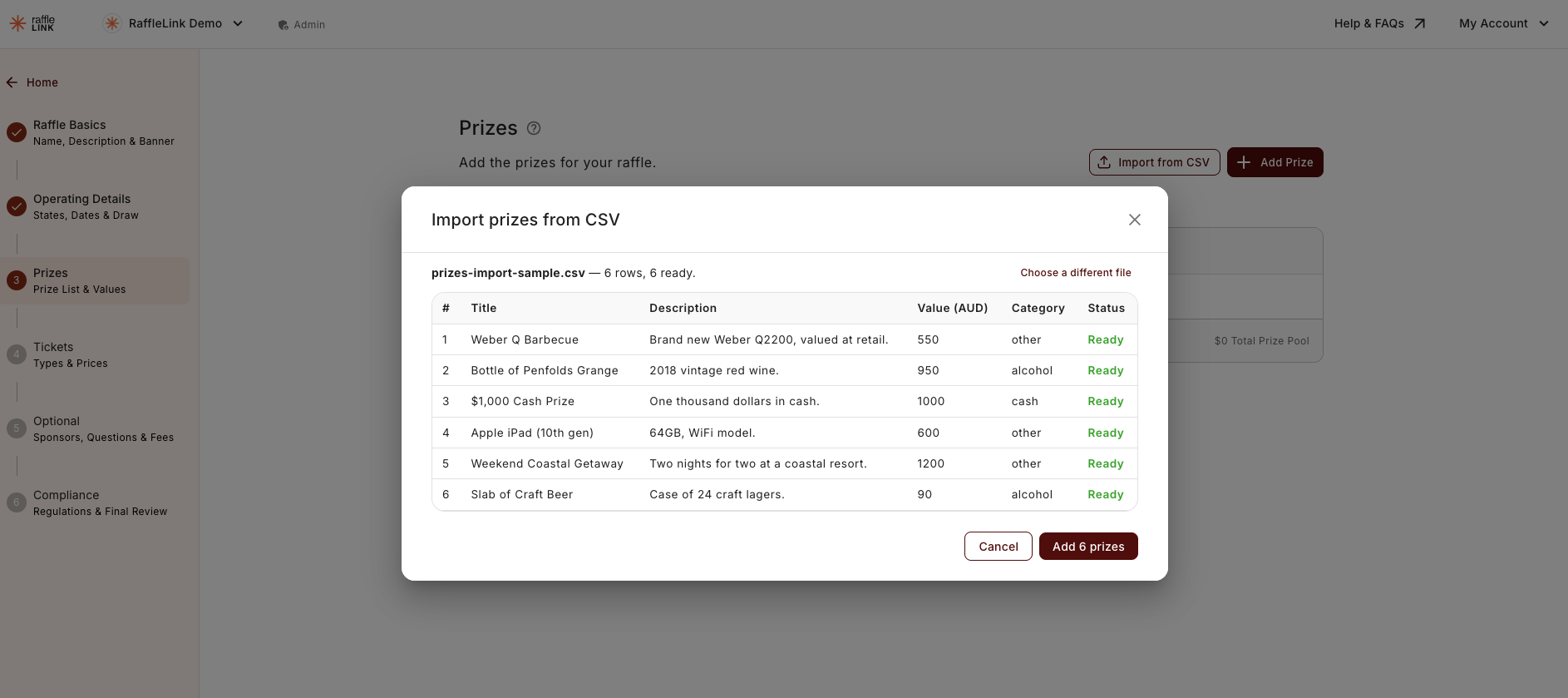
Drag the file into the import window (or click to choose it). RaffleLink shows you a preview of every row before anything is added.
If it all looks right, click Add prizes. They drop into your prize list — then save the step as normal to keep them.
Importing doesn't save on its own
Add prizes brings the rows into your prize list, but nothing is stored until you hit the usual Save on the step. If you leave the page without saving, the imported prizes won't be there when you come back.
The columns
Every row needs all four columns filled in:
| Column | What goes in it |
|---|---|
| Title | The prize name. Up to 255 characters. |
| Description | A plain-text description of the prize. |
| Value (AUD) | What it's worth, in whole dollars — 550 means $550. Cents are fine too (49.99). |
| Category | One of cash, alcohol, or other. |
A couple of things worth knowing:
- The order of your rows is the order your prizes appear in. Put your major prize first if you want it shown first.
- Value is in dollars, not cents.
550is $550 — a dollar sign and thousands commas (like$1,000) are fine. - Category has to be one of the three —
cash,alcohol, orother(capitals don't matter). Anything else will flag as an error.
What the preview catches
Before you commit, the preview marks each row ready or shows what's wrong with it (a missing value, a title that's too long, an unrecognised category, and so on). You need a clean sheet to import — if any row has an error, the button reads Fix errors to continue until you've sorted them. It's all-or-nothing: you can't import just the good rows and skip the rest, so fix the flagged ones in your spreadsheet and re-upload.
A few limits
- A raffle can have up to 250 prizes in total — and that's counted together with any prizes you've already added, so an import that would push you over the 250 is blocked.
- The file must be a
.csv(export one from Excel or Google Sheets) and under 1 MB.
Prizes that affect compliance
The import feeds straight into RaffleLink's normal prize checks. The one to watch: if any prize you import is in the alcohol category, your raffle's 18+ requirement switches on and stays on while an alcohol prize is in the list. Your total prize values also count toward permit thresholds the same way they would if you'd added each prize by hand.
Who can import
Anyone who can edit the raffle's prizes can use the import — that's Admins, and Affiliates for raffles they created. (Photos aren't part of the CSV, so add prize images afterwards on the Prizes step.)
Next: Tickets and pricing.