Run a hybrid draw
How the draw works when you've sold both online and paper tickets — and the two ways to settle a paper winner.
If your raffle sells paper tickets alongside online ones, the draw works almost exactly like a normal one — with one extra step for any prize a paper ticket wins. This page covers that difference; the basics are the same as Run the draw.
Two kinds of hybrid draw
Both hybrid draws are run by RaffleLink — the random draw is ours either way. What differs is how much you tell us about your paper tickets, and therefore how much work is left for you when a paper ticket wins.
| Hybrid Draw (Manual) | Hybrid Draw (Automatic) | |
|---|---|---|
| What you log | How many paper tickets you sold | Every paper ticket number you sold |
| What the draw tells you | That a paper ticket won | Which paper ticket won, by number |
| What you do afterwards | Pull a stub at random, then enter it | Find that stub and enter the holder's details |
Hybrid Draw (Manual) is the original hybrid draw and is still the default. It's the lighter option: you only ever log a daily count, and the draw decides how many prizes go to paper, leaving you to pull the winning stubs from the barrel yourself.
Hybrid Draw (Automatic) takes a little more work up front — you log each ticket number as you sell it — and in exchange nobody has to draw twice. The draw picks the exact winning stub and names it, so on the night you're looking up a number rather than running a second draw in front of everyone. 🎟️
Prefer to draw everything by hand?
Neither hybrid draw suits an event where you want to pull every winner from a barrel yourself. That's the Combined Hat Draw method — see Draw by hand.
Choosing between them
You pick your draw method on the Tickets step when you create the raffle, under Sales & Draw Method. There's a Which draw method is right for me? link beside it that opens a full comparison, including a "This method is good if" note for each one.
You can change your mind on a live raffle too: the Draw page has a Change action on the draw method card, right up until the draw runs.
Switching to Automatic needs your numbers
Because Automatic draws from the actual ticket numbers, every paper entry you've already logged has to name its tickets. If some of your entries are just a count, RaffleLink won't switch and will tell you which days need numbers — for example, "These logs only have a total: 12 Mar (40 tickets)." Add the numbers to those entries (delete and re-log them), then switch.
Going the other way — Automatic back to Manual — is always allowed before any prize is drawn.
Queensland Category 3 raffles
Hybrid Draw (Automatic) isn't available yet for Queensland Category 3 raffles, which run under a separately approved draw program. If your raffle needs those controls, the picker offers Hybrid Draw (Manual) instead and tells you why. See QLD Category 3.
Before you draw
Make sure every paper sale is logged. The draw uses what you've logged, so anything you haven't entered yet won't be in the barrel. Confirm your final paper tally on the Tickets page before you close and draw — on a raffle that sells paper, your dashboard timeline includes a Confirm Paper Tickets Sold step as a reminder.
As a safety net, if you go to draw a hybrid raffle with no paper logged at all, RaffleLink warns you first, in case the day's sales slipped your mind. The confirmation window also names which hybrid draw is about to run and shows your final counts, so you get one last look before anything is irreversible.
How the draw handles paper
RaffleLink draws across your whole pool — digital and paper together, fairly weighted by how many of each you sold. When you run the draw:
- If a digital ticket wins a prize, it's resolved automatically, just like an online-only raffle.
- If a paper ticket wins, there's one more step, and what it is depends on your method.
On Hybrid Draw (Automatic), the prize row names the winning stub straight away — Winner: Paper PA0581 (enter details at end) — because we know your ticket numbers.
On Hybrid Draw (Manual), the row reads Paper ticket — draw a stub, because the draw has decided that a paper ticket won without knowing which one.
Settle the paper winners
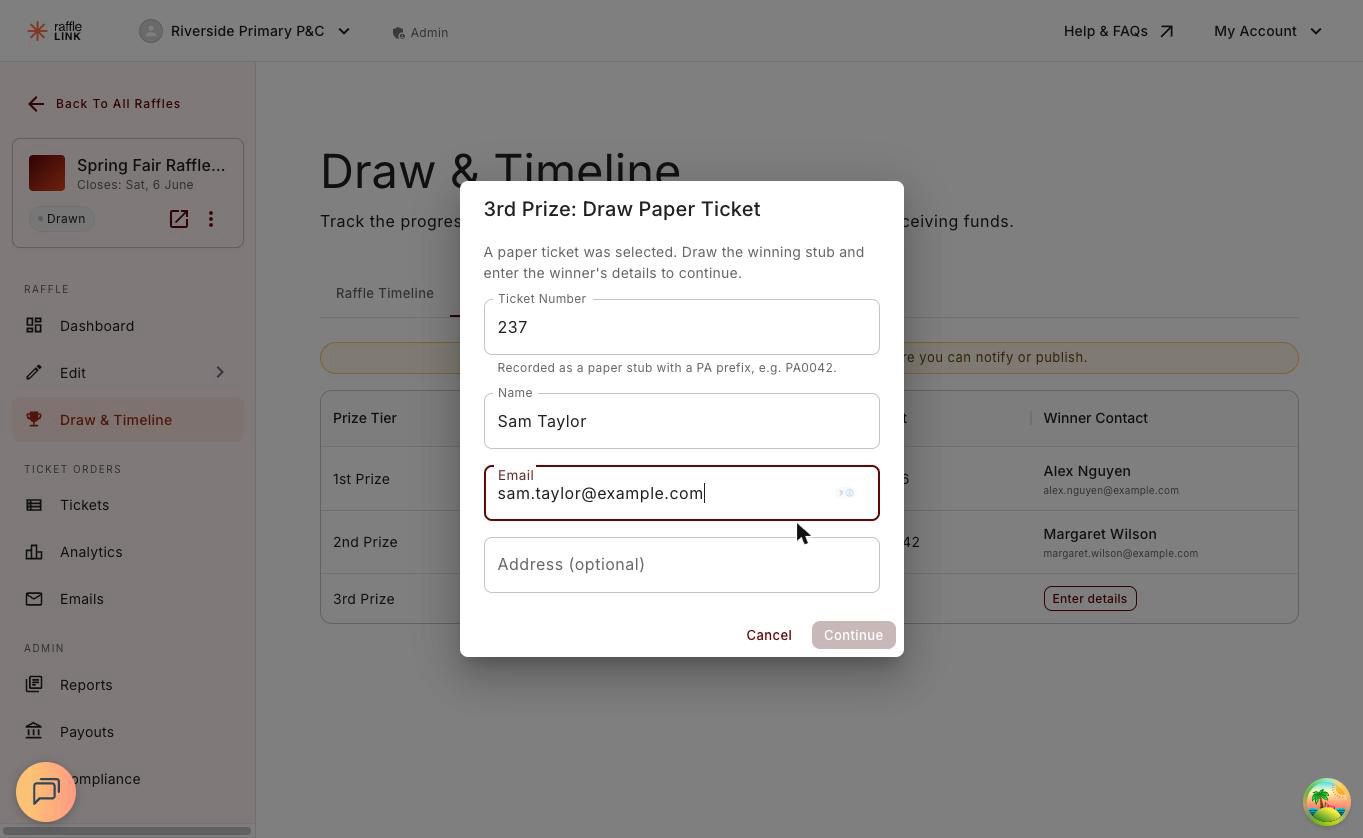
Once the draw finishes, if any prizes went to paper you'll see a hand-off window — Ready to find the paper ticket winners? on Automatic, or Ready to draw from your paper ticket stubs? on Manual — listing the prizes still to settle. Choose Start and RaffleLink walks you through them one at a time.
At each prize you can Skip For Now and come back later, or fill it in and choose Continue (Finish on the last one).
On Hybrid Draw (Automatic)
The window is titled with the winning stub — for example Enter 2nd Prize Winner (PA0581) — and the ticket number is fixed and read-only. Find that stub in your books and enter the holder's details:
| Field | Notes |
|---|---|
| Name | The winner's name. |
| So you can reach them. | |
| Mobile (optional) | If you have it. |
| State (optional) | Their state, if you have it — shown publicly as the winner's location, the same as for digital winners. |
If you imported your tickets from a CSV that included the buyer's details, those fields arrive already filled in for you to check and confirm.
On Hybrid Draw (Manual)
The window asks you to pull a stub: "This prize goes to a paper ticket — but we haven't picked which one. Pull a stub at random from the paper tickets you sold, then enter that stub's number and the winner's details below." Do exactly that, then enter the stub number along with the same details as above.
The ticket field expects a PA number by default. If your stubs use worded labels instead (something like Blue E01), choose Switch to custom ticket number and type it exactly as printed.
How stub numbers are stored
A plain number is saved in RaffleLink's standard form: your 42 becomes PA0042, padded to four digits so it matches the printed stub. 42, PA42 and #0042 are all understood as the same ticket, so it doesn't matter which way you type it. Worded labels are saved exactly as you type them.
Finish recording before you publish
If any paper winners are still missing their details, RaffleLink holds you up: Publish and Notify Winners both stay disabled until every one is recorded. You can leave and come back — the Winners tab keeps track of which prizes are still waiting.
What buyers see
On your public results page, paper winners appear like any other winner: their stub label (for example, PA0042) and, if you recorded it, their state as the location — but never a name or email. A paper buyer never filled in an online form, so the contact details you enter at the draw stay private; only the same ticket-and-location information shown for digital winners is published.
From here, publish the results as normal — that's the step that finishes the raffle. Emailing your winners is optional, and you can do it before or after.