Order professionally printed tickets
Have your paper tickets printed as perforated booklets and delivered — ordered and paid for inside RaffleLink.
You can print your own paper tickets for free from RaffleLink. But if you'd rather not push several hundred sheets through the office printer, you can order them professionally printed — perforated booklets on 80gsm stock, delivered to you.
You'll need paper tickets turned on
Professional printing is offered on raffles that sell paper tickets. If you don't see it, turn on paper tickets first on the Tickets step. 50/50 raffles are digital-only, so they can't order printed tickets.
Placing an order
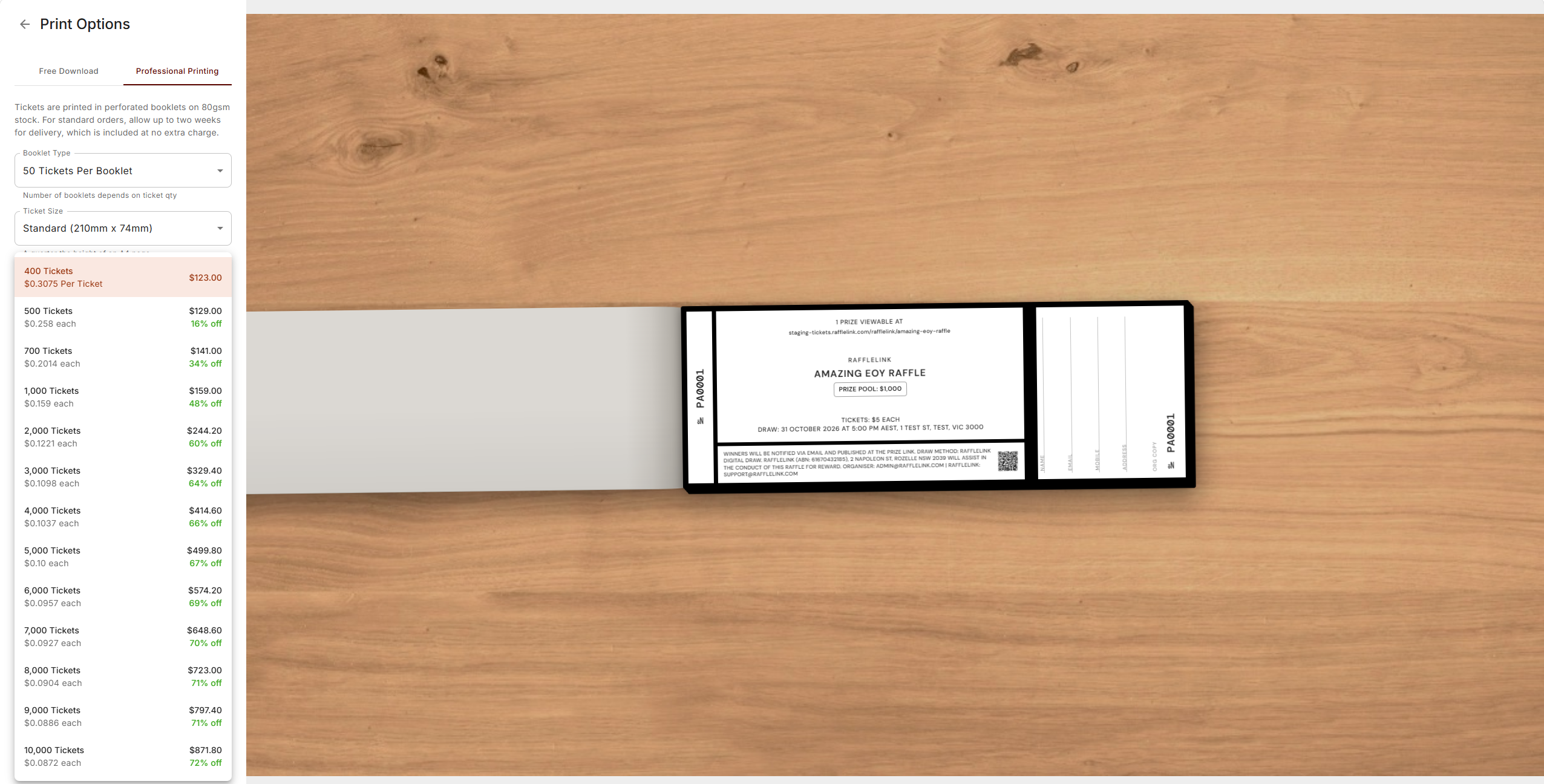
On the Tickets page, open the Paper Tickets tab and choose Print Options, then switch to the Professional Printing tab.
Choose your booklet type — 50, 25, 20, or 10 tickets per booklet. The number of booklets you get depends on your total ticket quantity.
Pick a ticket size — Standard (210 × 74mm, a quarter of an A4 page) or Large (210 × 99mm, a third of a page).
Choose your ink — Black & white, or Colour (single side). Colour carries a surcharge (currently +$45 per 1,000 tickets at standard size, +$60 at large), and it's already included in the prices you see — there's no separate line at checkout. Pick this before the quantity, since it changes every price below.
Choose how many tickets — 400, 500, 700, or 1,000, then every thousand from 2,000 up to 10,000. Each option shows the per-ticket price and the total, and larger runs carry a discount.
Set the starting number. Tickets carry the usual PA prefix, and RaffleLink shows the range you'll get (for example PA0001–PA0400). If the range overlaps tickets you've already printed, you'll be warned so you can shift the starting number. If you chose colour ink, you can also pick the border colour here — black & white orders don't have that choice.
Check out. Each quantity shows its own price as you pick it, and the checkout button shows your total — delivery is included at no extra charge. Checkout takes your shipping address, an optional notes box for any customisation, and your card details.
A live preview of your ticket sits beside the form as you change the options, and Download Design Proof gives you a PDF of it — worth grabbing if someone else needs to sign off on the artwork before you order.
After you order
You'll land on a confirmation with your order reference, and a copy goes to the email you gave.
Our team reviews every order before it goes to the printer. If anything needs changing, we'll email you. Otherwise, allow up to two weeks for delivery.
Ordered tickets are reserved against your capacity
The ticket numbers in your order are reserved as soon as it's paid, so they count towards your raffle's combined capacity and can never be issued again by a free download. That's what keeps your paper and digital numbering from colliding — see Sell paper tickets too.
On your bank statement the charge appears as RAFFLELINK* PRINT.
Need something different?
If your order doesn't fit the standard options — a different stock, unusual perforation, anything bespoke — choose Request Custom Order on the same page. It opens the support form already set to printing, so you just describe what you need and send it.
This is a purchase, not a deduction
A print order is something you pay RaffleLink for directly by card. It's separate from your raffle proceeds — it isn't taken out of your payout, and it doesn't appear on your raffle's tax invoice. See How the money works for how raffle money flows.