Reopen a closed raffle
If your raffle closed before you meant it to, you can often reopen it — here's when it's possible, and how.
A raffle that's closed sits in awaiting draw — sales have stopped and it's waiting for you to draw a winner. Usually that's exactly what you want. But sometimes a raffle closes before you were ready: the end date slipped past, the draw time arrived, or every ticket sold out — and you'd like to keep selling a little longer. In most cases, you can reopen it.
Two kinds of reopen
There are two different ways a closed raffle goes back to selling, and it's worth knowing which is which.
It reopens on its own
A raffle that sold out can reopen by itself. This happens when buyers reserved tickets but didn't finish paying — those tickets free up again, so the raffle has room and goes back to open automatically. You don't do anything; you'll just get an email letting you know, headed "reopened because tickets became available again."
That's the case covered briefly in Close your raffle — it's normal, and it simply means a few more tickets became available.
You reopen it yourself
The other kind is deliberate: your raffle closed, you didn't mean for it to (or you've changed your mind), and you reopen it by editing it — extending a date or adding capacity. That's what the rest of this article is about.
Reopen it yourself
You reopen a closed raffle by changing the thing that closed it. Match the reason it closed to the edit that brings it back:
- It closed because the end date passed → push the End Date out to a future date.
- It closed because the draw time elapsed → push the Draw Date out to a future time.
- It closed because it sold out → raise the Ticket Capacity above the number you've already sold.
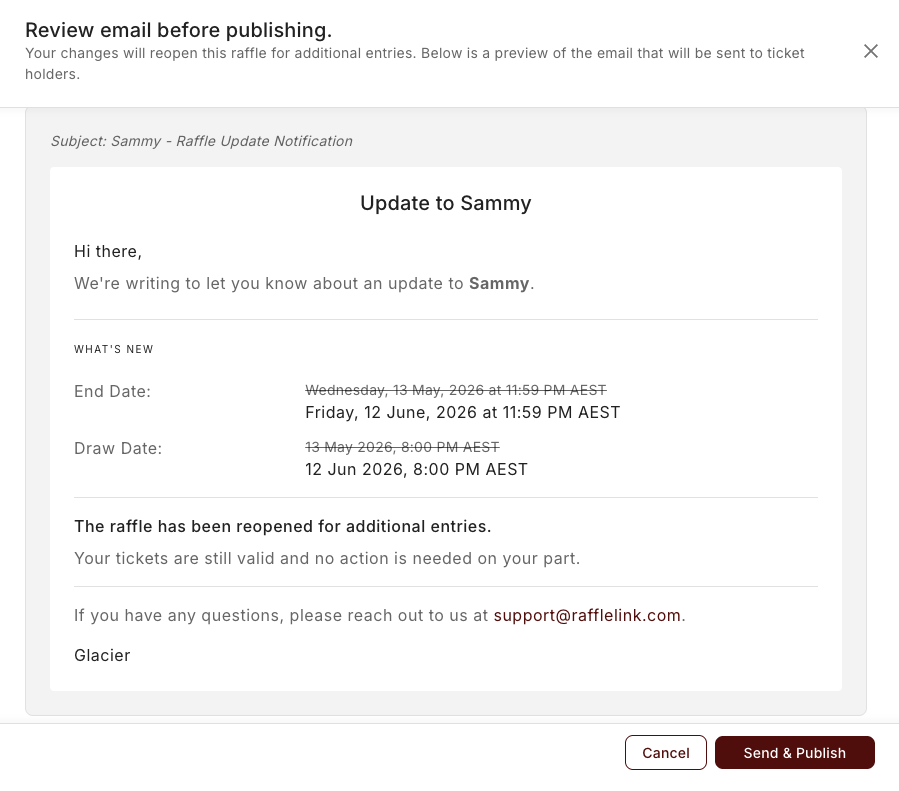
Each of these is a gated field, so changing it follows the normal edit-and-notify flow: you make the change and save. When your edit will reopen the raffle, the preview step tells you so before anything goes out — "Your changes will reopen this raffle for additional entries." Hit Send & Publish, and your raffle goes back to open. Your existing ticket holders get the standard change-notification email, so everyone knows sales are on again.
When you can still reopen
Reopening isn't always possible — it depends on whether your edit genuinely leaves the raffle able to sell again. A few rules decide it:
It has to still be awaiting draw. Once you've actually run the draw, the result stands and the raffle can't reopen. Same if it's been cancelled. Reopening only works in the window between closing and drawing.
Your edit has to undo the reason it closed. Saving a cosmetic change won't reopen anything — the change itself has to extend the end date, push the draw date, or add capacity.
And afterwards, all three of these have to be true for the raffle to accept entries again:
- the end date is in the future,
- the draw date and time are in the future, and
- there's capacity left — your ticket limit is higher than the number sold.
So if your raffle closed for more than one reason — say it sold out and the draw time has passed — you'll need to fix both: add capacity and push the draw date. Changing just one won't bring it back while another condition is still blocking it.
A short grace window on the end date
If your raffle only just closed, RaffleLink gives the end date a brief grace period (around a day) — so a same-day raffle that closed a few hours ago can still be reopened by pushing the draw time out, without you having to touch the end date. Once that window's passed, you'll need to extend the end date itself.
Compliance still applies
Reopening runs the same checks that applied when you first activated the raffle. If a change would put the raffle outside what your state's rules allow — for example, a permit window that's since lapsed, or a draw date pushed beyond the limit some states set — RaffleLink will stop you and explain why, rather than quietly reopening it into a compliance problem. See Compliance and permits for the per-state detail.
The one-line version
A closed raffle can reopen on its own (sold-out tickets freeing up) or because you reopen it — by extending the end date, pushing the draw date, or adding capacity. It's only possible while it's awaiting draw, your edit has to leave the end date, draw date, and capacity all clear, and it still has to pass your state's rules.