Download your tickets
Getting a PDF copy of your tickets.
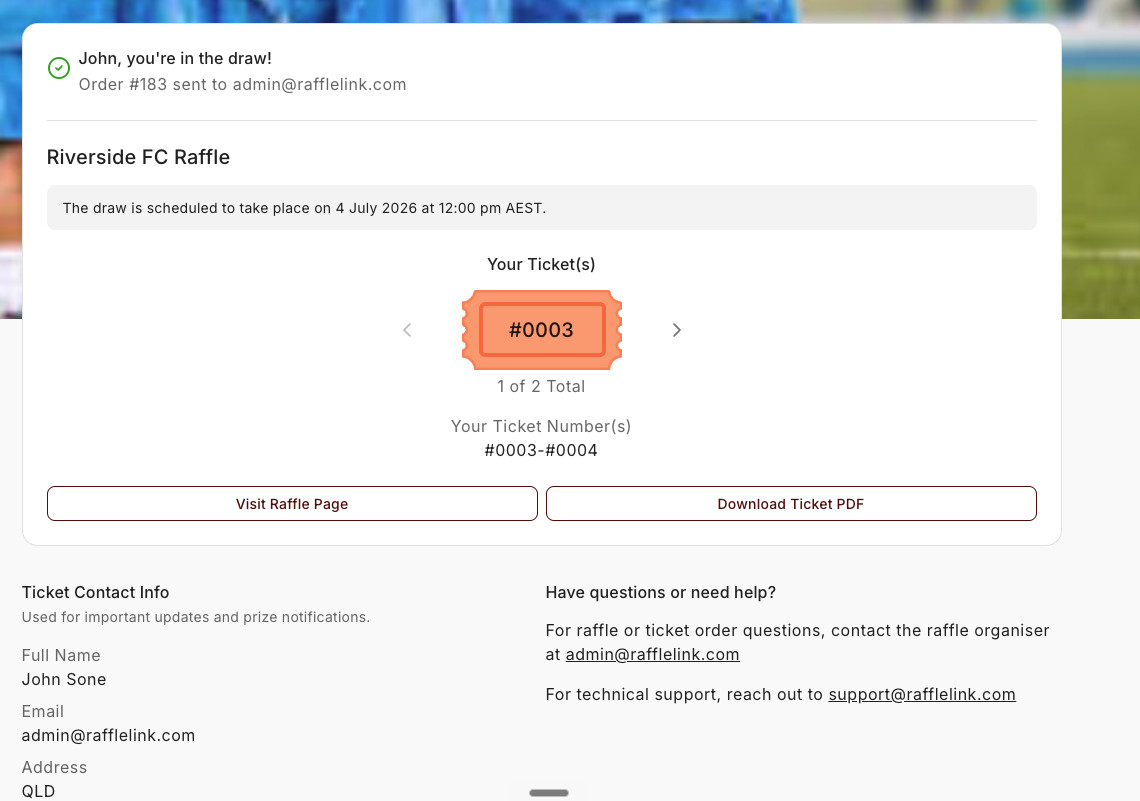
If you'd like a copy of your tickets to keep or print, you can download them as a PDF from your tickets page.
How to download
- Open the link in your confirmation email to reach your tickets page.
- Choose the Download Ticket PDF option.
- Your tickets download as a PDF, ready to save or print.
The PDF covers your whole purchase — all the ticket numbers from that order in one document, along with the raffle's details and sponsors.
Do you need to?
Not really — your tickets are safe in RaffleLink whether or not you download them, and the draw uses them automatically. Downloading is just handy if you like a physical copy, want to print one out, or feel better having it saved somewhere. Your entry doesn't depend on it.
Your ticket numbers
Each ticket has its own number, and those numbers are what go into the draw. You'll see them on your tickets page and in your confirmation email. If your tickets are a range (say, 1050 to 1059), that means you hold every number in between — all ten are yours.
If you bought a lot of tickets, the page shows the first ten and a Show 10 more button to bring in the rest a batch at a time (Show fewer collapses them again). The total sits underneath — "27 Total" — and the Your Ticket Numbers line always spans your whole order, however many are on screen. Nothing is missing; it's just tidier than a wall of numbers.